
Craft Anything · study · build · check
Study a target with Craft Anything, then build your own
Independent guides for Craft Anything, the open-source app that studies a website, app, or game you are allowed to examine, then works with a coding agent on your computer to build and check a new project. Installers stay on GitHub Releases.
Not affiliated with the ArtCraft team or the Craft Anything maintainers. We do not host installers. Downloads go to GitHub Releases. Use the software only on targets you are allowed to examine.
Install path
Pick the build for this computer
Windows x64 gets the MSI. Linux x86_64 gets the AppImage, including Steam Deck in desktop mode. macOS gets the universal disk image. If the direct link fails, open the release and choose Assets.
Install, do not compile
The published installers are the normal path. Building from the Rust source tree is only for people who want the development checkout.
Sign in a coding agent
Inspection can run without an AI account. Building a new project needs a coding agent already signed in on this computer. Claude Code is the agent the project documents first.
Start in Clean room
Clean room is the default. It works from what you can see. Deep mode, which reads internals, is a separate choice for targets you are allowed to inspect that way.
What Craft Anything is
Craft Anything is an early-alpha desktop app, command-line tool, and MCP server from the storytold/craft-anything repository. You point it at a target, say what you want made, and it runs four steps: Study, Build, Check, and Ready. Study records evidence about the target. Build asks a coding agent on your machine to create a new project. Check compares that project with the original. Ready is where you open the result or ask for another pass. The same engine sits behind a Simple window and an Advanced workbench. This website only explains how to download, install, and start. It is not the official site at craftanything.lol, and it does not redistribute binaries.
What you need before the first project
A normal install does not need Rust. You need a supported operating system, the matching release file, and — when you want the app to build something — a coding agent signed in locally. Claude Code is the path the project says works today. Other agents exist in various states of completeness; `craft-anything-cli doctor` is the checklist, not this page. New projects default to a Craft Anything folder under Documents. The app is alpha: expect rough edges, and read the release notes when something that used to work stops.
- Windows, Linux, macOS, or the Linux x86_64 build on a Steam Deck
- The installer from GitHub Releases, matched to CPU architecture
- A coding agent on this computer if you want Build, not only inspection
- Permission to examine the target you point it at
Simple, Advanced, and the two inspection modes
Simple asks what you want to make and shows the four steps in plain language. Advanced is the workbench: search, functions, strings, evidence, and the agent console. Both drive the same engine. Separately, Clean room is on by default and refuses tools that would read the original’s code or files. Deep turns those tools on, including Ghidra when you have installed it. The comparison page is the decision table. Neither mode is a reason to inspect software you are not allowed to inspect. The project states that Craft Anything does not bypass DRM, logins, or anti-cheat.
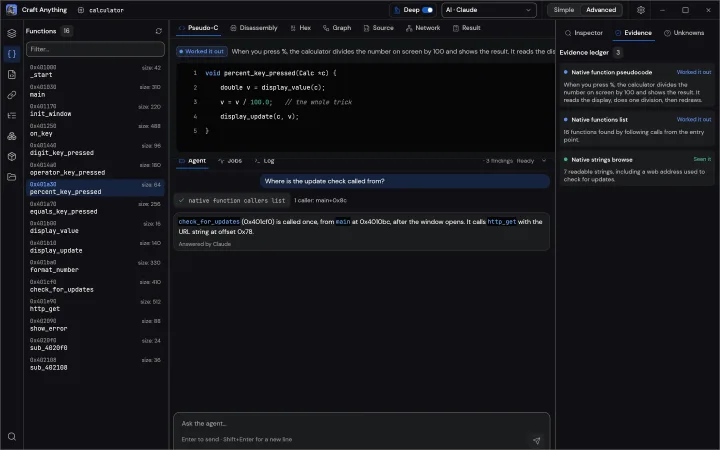
If the download buttons fail
The buttons on this page call GitHub’s latest-release API and link the current Windows MSI, Linux AppImage, and macOS disk image. When that request fails, or when you need ARM, FreeBSD, a portable zip, a .deb, a Flatpak, or the browser zip, open the Assets list on the release and pick the file yourself. This site does not keep its own copy of those files, so an old mirror cannot ship a stale build. Checksums are in SHA256SUMS.txt on the same release. Compare that hash before you run a file you saved days ago.
This site is not official. We do not host installers. Downloads go to GitHub Releases for storytold/craft-anything. Examine only software you own or are allowed to examine.
Who this unofficial guide is for
This page is for people who already decided to try the published desktop app and want a short map of files, first launch, and what happens after the window opens. It is not a review, not a tutorial on reverse engineering, and not a substitute for the project README. If you only want to inspect a file in a browser, the release also lists a WebAssembly zip; that viewer is a different product surface and does not replace the Windows, Linux, or macOS app. If you want to rebuild a site or a game with an agent, stay on the desktop or CLI path, then continue to Setup. The product story lives on craftanything.lol and the ArtCraft pages; code, STATUS.md, and Assets live on GitHub. These pages are only the filename and first-launch map for each operating system.
How a first session usually looks
After install, Simple mode asks what you want to make. You point at a URL or a local target you are allowed to examine, write a request in plain language, and press Start. Study records evidence. Build hands a new project to the coding agent already signed in on this computer. Check compares the result with the original — for a website, at a few screen widths. Ready is where you open the folder or ask for another pass. You can stop after Study if you only wanted questions. You can keep Clean room on for the whole session. You can switch to Advanced if you need the workbench. None of those choices require a second installer or a second GitHub release asset. Project files default to a folder under Documents; each project keeps a request history, captures, the generated app, and an inbox for questions the agent cannot decide alone.
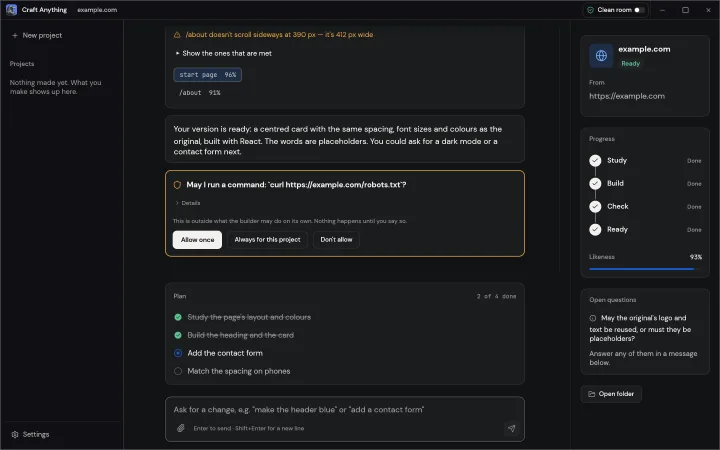
What this site will not host
Installers, checksums, and release notes stay on GitHub. We do not mirror MSI, AppImage, or disk-image files. We do not accept account tokens, target dumps, or private project archives by email. We do not walk through defeating DRM, logins, or anti-cheat. The upstream project states the same limits. If a download button on this page disagrees with the Assets list, trust Assets. If a page here disagrees with STATUS.md, trust STATUS.md. The contact address is only for this website’s copy and links. Privacy and Terms describe this domain, not the desktop app.
- Binaries: GitHub Releases only
- App bugs: GitHub Issues or the project Discord
- Guide corrections: support@craftanything.online
FAQ
- Is craftanything.online the official Craft Anything website?
- No. The project site is craftanything.lol, and the code and installers are on GitHub under storytold/craft-anything. This site is an independent English-only install and setup guide.
- Do I have to install Rust?
- Not for the published installers. Rust 1.97 or newer is only for building the app from the source checkout.
- Does the download include a coding-agent account?
- No. You sign in to your own agent. Craft Anything runs that program; it does not take your agent password.
- Where do software bugs go?
- File them on the GitHub issue tracker, or ask in the ArtCraft Discord. This site’s email is only for the guide.
- Can I run the browser zip instead of the desktop app?
- The web zip is a local file viewer. It does not run the Study → Build → Check → Ready loop the desktop app and CLI use.
- Does Craft Anything include games or sample targets?
- The installer is the app. You supply a target you are allowed to examine. Sample screenshots in the README are not bundled as playable titles on this site.